


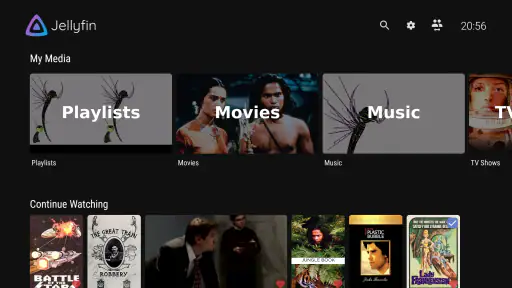
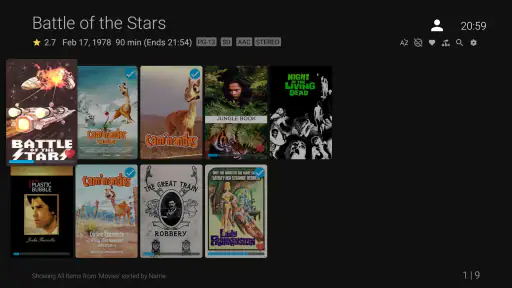

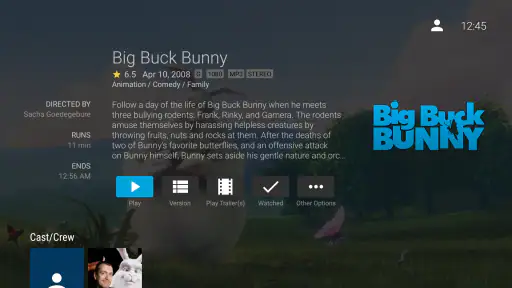

I spent time with Jellyfin for Android TV as a living-room client rather than treating it like a simple phone video player. That distinction matters. This is the official Android TV app from Jellyfin, a free way to reach a Jellyfin media library from a television, streaming box, or another compatible large-screen setup. My overall impression is that it makes the most sense for people who already value control over where their media lives and how they access it. It is less convincing for someone who simply wants an instant catalog with no server-side setup or technical decisions.
The app sits in the video players and editors category, but its real role is narrower and more useful: it is a remote viewing window for a Jellyfin installation. I found the experience most comfortable when browsing with a remote, choosing something from a familiar library, and settling into playback without needing to handle a phone. It feels designed around the television as the main screen, not as an afterthought squeezed into a mobile interface.
What makes the Android TV experience worth considering
The first trust signal is straightforward: this is the official client developed by Jellyfin, rather than an unofficial viewer with an uncertain relationship to the service. That does not automatically make every experience perfect, but it gives the app a clear identity. I know what it is meant to connect to, and I am not being asked to confuse it with a general-purpose streaming platform.
Jellyfin has built a sizeable audience around this approach. The app has passed one million installs, carries an average rating of 4.5 from roughly three thousand ratings, and remains free. Those figures do not guarantee that it will suit every television setup, but they do suggest that the Android TV client is not an abandoned experiment. Its age rating is Everyone, which fits a media-access tool whose actual viewing content depends on the library connected to it.
I also appreciate that the app’s identity is relatively honest. It does not pretend to replace every streaming service. Its value comes from giving a television-friendly interface to media managed through Jellyfin. If you already have that environment, the app can feel like the missing front end. If you do not, installing it alone will not magically create a ready-to-watch catalog.
The setup question you should answer first
Before downloading it, I would ask one practical question: do I already have access to a Jellyfin server? The Android TV application is not the whole Jellyfin system. It needs a library and a connection to that library, so a newcomer should expect at least some setup beyond opening the app for the first time. That is the biggest difference between this and services where the account and catalog are prepared by the provider.
This arrangement can be a strength when I want to keep my own collection organized in one place. It can also be a barrier if I want a frictionless evening with no configuration. A person who dislikes network settings, server maintenance, or troubleshooting should think carefully before choosing this route. The client may be free, but the overall experience depends on the environment behind it.
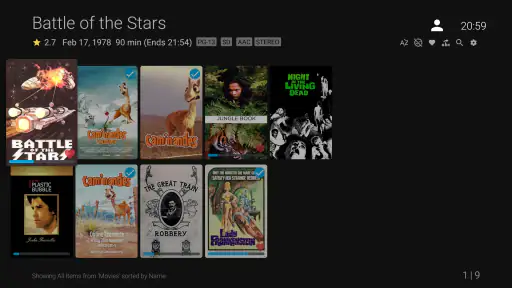
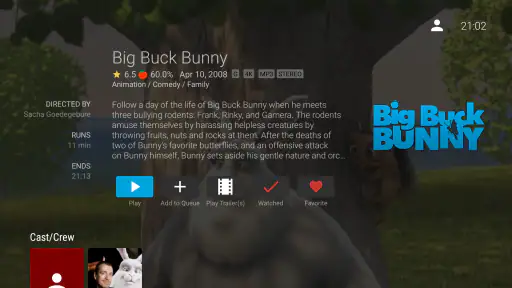
Once the server is available, the television-focused design is the main reason to use this particular client instead of opening a browser or trying to navigate a mobile application through casting. Menus are intended for distance viewing, selections are made with a remote, and the flow is built around browsing, choosing, and watching. I found that more natural than turning a phone into a permanent control surface.
Where the app earns trust, and where it does not do the work for you
Trust here comes less from flashy presentation and more from clear boundaries. The app is a client for Jellyfin, and its usefulness is tied to the server and account choices that surround it. I would not treat the installation itself as proof that every privacy or access question has been solved. The sensible approach is to look at the server address, the account being used, and who can reach that server before handing the remote to another person.
That is especially important in a shared home. A television is a public screen, even when the server is private. I would create or use an account with only the library access that person needs, rather than assuming everyone should see everything. Keeping separate profiles or accounts also makes recommendations, watch progress, and viewing history less confusing when several people use the same screen.
The app’s free price is helpful for testing this arrangement without another subscription decision. Still, free should not be confused with effortless. The time cost can move into organizing files, maintaining the server, checking network access, and making sure the television can communicate with it. For me, that trade-off is worthwhile when ownership and control matter more than convenience, but it is not the right bargain for everyone.
Controls that matter during everyday viewing
On a normal evening, I want the remote to handle the basics without making me reach for another device. The app’s purpose is strongest in that simple routine: open the client, browse the connected library, resume something familiar, or select a new title. The benefit is not a novel playback trick; it is having a dedicated large-screen path into a collection that I manage elsewhere.
A realistic example would be a family using one television after dinner. One person can browse the shared library, another can continue a partially watched program, and the household can keep its viewing inside the same server instead of switching between a file browser, a laptop, and a casting control. That workflow is more orderly than plugging in storage and searching through folders, particularly when the library is maintained with consistent artwork and naming.
There is a less obvious advantage for people who watch in different rooms. A Jellyfin setup can make the television client part of a wider personal media routine, while the server remains the place where the collection is organized. The Android TV app is then a focused endpoint rather than another independent library. The trade-off is that a problem on the server or network can affect the living-room experience even though the client itself is open and responsive.
I would also pay attention to the difference between direct playback and server-assisted playback. In a well-matched setup, the television may handle a file smoothly. In another setup, the server may need to adapt the stream for the device or connection. That can change how much processing, bandwidth, and waiting are involved. I would not assume that a fast internet connection automatically fixes a local compatibility issue, or that a powerful television removes every server-side demand.
Data-sensitive moments deserve deliberate choices
The most sensitive moments are not necessarily the first launch screen. They are the decisions around access: which server address is entered, which account signs in, and whether the television is being used by one person or a household. I recommend checking those choices calmly rather than accepting a setup that exposes more of the library than intended.
If I were configuring the app for guests, I would avoid sharing an administrator account. A limited account is a much safer everyday habit because it reduces the damage caused by an accidental change and keeps private sections of a collection separate. This is a practical form of privacy that users can control directly, regardless of how polished the interface looks.
I would also be cautious with a television that stays signed in indefinitely. That is convenient, but anyone with access to the room may be able to browse the connected account. On a personal television in a private room, permanent access may be acceptable. In a shared house, holiday rental, or guest room, signing out or using a restricted account is the more sensible choice.
Another point is viewing history. A shared account can reveal what someone has watched simply through progress markers or recently viewed items. Separate accounts are therefore not just an organizational convenience; they can prevent small but awkward privacy leaks. This is one of the details that a short store summary cannot explain, but it affects whether the app feels comfortable in a real household.
How it compares with familiar alternatives
Compared with a mainstream subscription service, Jellyfin for Android TV offers a different kind of control. A subscription platform is usually easier at the beginning: install, sign in, and browse a catalog maintained by someone else. Jellyfin is more attractive when the collection is yours, when you want one interface for media already under your management, or when you prefer not to make the catalog itself dependent on a monthly service.
Compared with casting from a phone, the dedicated television client is less dependent on a second device being charged, nearby, and connected correctly. I find that valuable for ordinary viewing. Casting can still be better when I want to send a single clip quickly or use a phone as a richer search tool, but it adds another layer of control that the Android TV app is meant to remove.
Compared with a browser opened on a television, the Jellyfin client feels more purpose-built for remote navigation. A browser can be a useful fallback, especially when a television platform is awkward or unsupported, but it is rarely as pleasant for repeated living-room use. The dedicated app keeps the experience centered on the media library instead of browser tabs, cursor movement, or a keyboard that is difficult to use from the sofa.
Compared with a basic file player, this client can provide a more coherent library experience when the Jellyfin server is properly organized. A file player may be quicker for opening one local video, and it avoids server configuration entirely. I would choose that simpler option for occasional offline playback. I would choose Jellyfin when I want a maintained collection, user separation, and a television interface connected to a central library.
Limitations I would consider before installing
The largest limitation is dependency. The app cannot compensate for a poorly arranged library, an unreachable server, an account with the wrong permissions, or a network that regularly drops connections. When something goes wrong, the source may be outside the television client. That can make troubleshooting feel less direct than it would with a conventional streaming application.
There is also a learning curve for people who have never managed a personal media server. Even if the Android TV interface itself is approachable, the surrounding system may involve decisions about storage, organization, user access, and connectivity. I would not recommend this as the first choice for someone who wants to avoid all technical ownership. The free download is a low-risk way to try the client, but it does not remove the responsibilities of the wider setup.
The client is built for Android TV, so I would not expect the same priorities as a phone-first player. If my main need is editing videos, recording content, or making detailed changes on a handheld device, this is the wrong category of tool. Its job is watching a Jellyfin library on a large screen, and judging it by mobile editing features would miss the point.
Hardware and file compatibility can also shape the experience. A title that plays perfectly in one environment may require more work in another, depending on the television, server, and media format. I would test a few representative files before moving an entire household to the setup. That small trial can reveal whether subtitles, high-bitrate material, or less common formats create a problem for the particular equipment in use.
Version, accessibility, and the practical decision
The current version is 0.19.10, and the app supports Android 5.0 or later. That broad minimum requirement makes it relevant to older compatible hardware, although the age of a television or streaming box can still affect speed and playback quality. I would judge an older device by actual responsiveness and decoding ability rather than by the operating-system requirement alone.
The Everyone content rating makes the client broadly suitable as an installed application, but it should not be mistaken for a guarantee about the media available through a server. The content a viewer can browse depends on the library and account access. Parents or household administrators should therefore manage the server and user permissions with the same care they would use for any shared media system.
One useful habit is to separate “can this app open?” from “can this setup play everything I own?” The first question is answered quickly. The second requires testing the actual television, network path, server, and library. I would begin with a short sample: one ordinary file, one high-quality file, and one item with the subtitles or audio arrangement I use most. That gives a much more honest picture than judging the app from its launch screen.
I would also decide who is responsible for maintenance. In a family, the person who owns the server may become the unofficial help desk whenever a television cannot connect or a title behaves differently. That is not a flaw unique to this app, but it is a real social cost of choosing a self-managed media system. If nobody wants that role, a hosted streaming alternative may be more comfortable even if it offers less control.
My cautious recommendation
After using it as intended, I see Jellyfin for Android TV as a focused and sensible client for viewers who already have a Jellyfin environment and want a proper television experience. Its strongest qualities are the clear purpose, the free entry point, the remote-friendly presentation, and the ability to make a personally managed collection feel more like a unified service.
I would recommend it to someone who values ownership, wants separate access for household members, and is willing to spend time getting the server and network right. I would especially suggest starting with restricted user accounts and testing a few real files before inviting everyone to use the television. Those two steps prevent many avoidable frustrations.
I would skip it if I want an instant catalog, dislike server administration, or mainly need a mobile video editor. In those cases, a subscription service, a simple local player, or a phone-first tool will probably be a better fit. The app is trustworthy as a clearly defined Jellyfin client, but the quality and privacy of the overall experience still depend on the choices made around the server.
For the right household, that is a fair trade. I would rather use a client whose role is understandable and whose access can be shaped around my own library than force a personal collection into a workflow designed for someone else’s catalog. Just go in knowing that the app is the television-facing part of a larger system, not a complete streaming service by itself.


